
Traffic Case Records in Clare County
Traffic tickets and civil infractions in Clare County land in the 80th District Court. Its docket can show the citation, your response, and hearing history. Payment details appear too. A ticket written by a city or village officer may begin at a local bureau instead. Contested matters move to the district docket. So the court named on the citation is always the starting point. MiCOURT Case Search can open public traffic case information. Access depends on how each court is configured. The local 80th District payment route and Michigan PayTix add two more lookup paths. They help you find a citation and its amount. One caution matters here. Payment access is not a certified court record or a complete register of actions.
Clare County Traffic Cases in District Court
Clare County's traffic and civil infractions belong to the 80th District Court, styled 80-1 Clare. That court also handles misdemeanor traffic work. Felony cases pass through its preliminary stages. The office sits at 225 W. Main Street in Harrison, and the published phone number is 989-539-7173. Call when a ticket has not posted. Call to confirm a hearing date too. The same staff can provide a copy of a court file when you need one. Clare, Harrison, and Farwell have no municipal trial courts. A local bureau can accept an ordinance admission. Once a matter is contested or transferred, though, the district docket takes over and the bureau drops out of the picture. City police and village records show only where a case began, while the district court keeps the judicial case history it receives.
Clare County Traffic Ticket Lookups
The local 80th District payment link is the first stop for a Clare ticket search. It opens a Five Point Payments form. That form accepts three lookup keys. Search by case number, by last name and date of birth, or by driver's-license number. Enter only what the case at hand requires. When the ticket names the Clare district court, try this route before any statewide selector.
- Read the citation for its court, case or ticket number, and appearance information.
- Use the 80th District Court Clare payment portal to reach the local lookup workflow.
- Search by the ticket or case number first, or use the supported name and date-of-birth route when the number is unavailable.
- Review the returned case information, amount, deadline, and court date without changing the ticket details to force a match.
- Use Michigan PayTix only as its current county and court selector presents it, because the local route is the primary Clare source.
- Call 989-539-7173 or visit the 80th District counter if the ticket does not appear or a date needs court confirmation.
The amount may post before the full history. That gap is normal. Keep the citation, court choice, and result together when you call the court about a missing or unclear record.
Clare County Traffic Search Fields
The local portal takes you through a case-or-ticket workflow. It is not a broad court-history search. Its stages run from lookup to information, amount, payment, and receipt. The state PayTix interface works differently, with county and court selectors plus several lookup modes. Whatever a result shows, check it against the citation and the court's current record.
| Channel | Documented lookup input | Use |
|---|---|---|
| 80th District local payment route | Case number, last name plus date of birth, or driver's-license number. | Primary Clare ticket lookup and payment workflow. |
| Michigan PayTix | Last name and ticket number, last name and date of birth, driver's license and state, or license plate and state. | State selector route with periodic-maintenance notice. |
| MiCOURT Case Search | Selected court with name or case-number search. | Public case information when traffic data is returned for the court. |
The Clare 80th District payment portal is the official page where a ticket number, name, or license number pulls up the amount and the options for paying it.
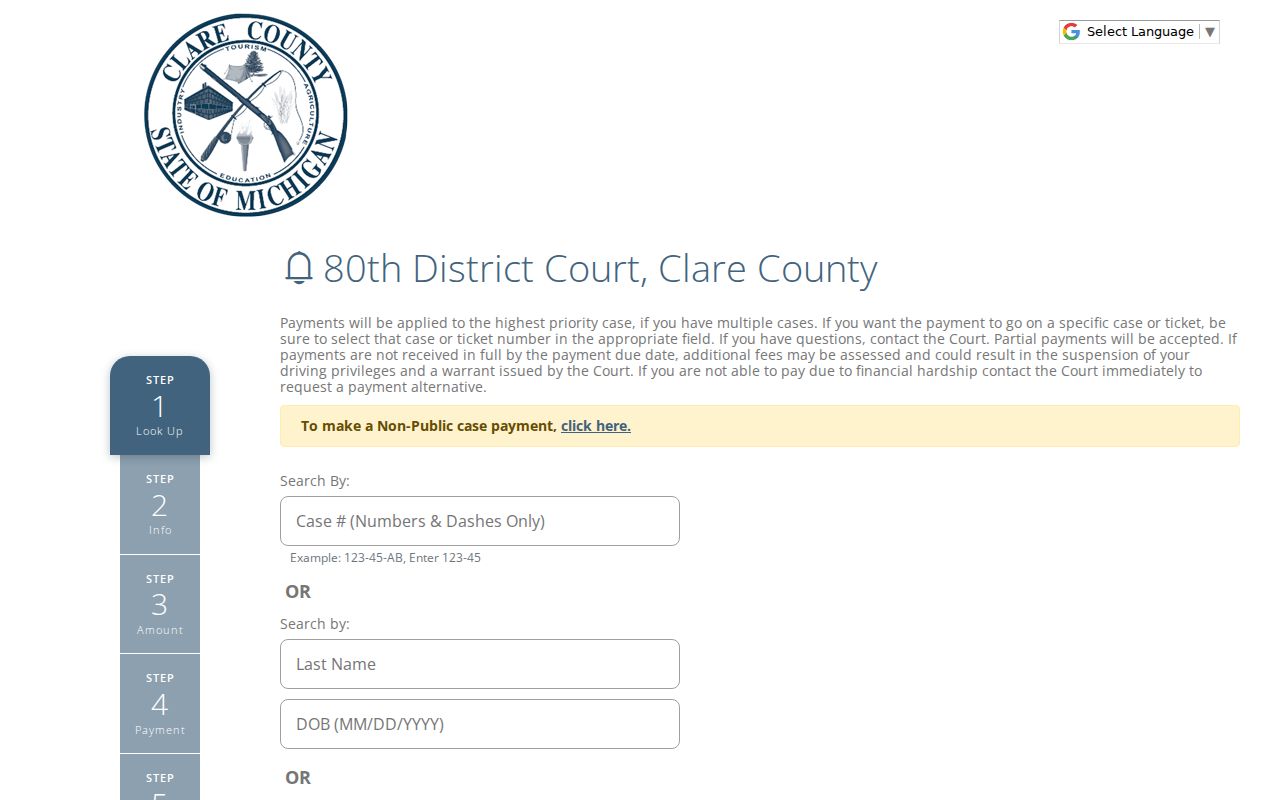
It links a citation to the court's payment workflow. If no ticket comes back, call the court rather than re-entering endless variations of your information.
Traffic Court Dates in Clare County
The citation carries your first appearance date. The case history may then show a next hearing. MiCOURT Court Display can be checked by date for party name, time, room, and case number. That view only shows posted events. A continuance, reset, or later entry can turn an earlier date into a historical one, so treat the newest entry as the live setting.
| Citation or case number | The local payment form gives a numbers-and-dashes example such as 123-45. Use the number shown on the actual ticket. |
|---|---|
| Court | For a Clare traffic matter, confirm whether the citation names 80th District Court or another court source. |
| Date and time | The appearance or hearing information shown on the citation, case history, or confirmed by the court office. |
| Room | The MiCOURT Court Display field when the selected date and court return a room. |
| Status | The public case status or dated entry, read with the full court history rather than in isolation. |
Start with the newest future entry. Match it against the Court Display date view, then call the district office if either source is missing or the two conflict. A printed ticket can go stale after a reset.
Clare County Traffic Court Date Checks
MiCOURT Court Display is the official date view for checking a posted event. Pick the court and the date. Then compare the party-name, time, room, and case-number columns against your ticket or case history. It settles questions about a known setting. It cannot replace the court's confirmation when a hearing is missing or looks inconsistent. No fixed posting window is published. No local reset-code list is posted either. If your citation returns no match, keep the ticket and confirm the selected court. Then call the 80th District office. That habit keeps a temporary online gap from being mistaken for a change in your appearance requirement.
Paying a Ticket vs Fighting It
Michigan's citation statutes set your options at or before the appearance time: admit responsibility, admit with an explanation, or deny responsibility and request the hearing the citation and statute allow. Three paths, one deadline. The citation and its deadline decide which fits. Keep proof of whatever you file. Then verify that the court received your payment or response.
| Admitting responsibility | Denying responsibility |
|---|---|
| Uses the response route allowed on the citation and may include payment or an explanation. | Requests the applicable informal or formal hearing process under the statute and court procedure. |
| Use the local payment route or another method the citation and court allow. | Follow the appearance instructions, response deadline, and hearing procedure shown on the citation. |
| Retain the receipt or confirmation and check the court record for the posted result. | Retain proof of the response and confirm the resulting setting with the court. |
Do not miss the response date: Michigan materials describe default and possible license consequences when a person fails to answer. The court can provide notice and a compliance window, and the exact consequence depends on the citation, offense, court action, and current law. Contact the court promptly if the citation does not state a date or the response route is unclear.
A payment confirmation by itself does not settle the case. The court decides the status, so check the district docket's case history or call the office if you need proof your response was received.
Clare County Traffic Payment Steps
The 80th District payment link opens a Five Point form. It has five steps: lookup, information, amount, payment, and receipt. Full and partial payments are both allowed. If you owe on more than one case, the money is applied according to priority. Hardship or a different arrangement takes a call to the court. The form collects card and account details. Enter that information only in the official payment channel. The official Five Point form for 80th District Court, Clare County shows the case-or-ticket lookup and payment workflow the court uses.
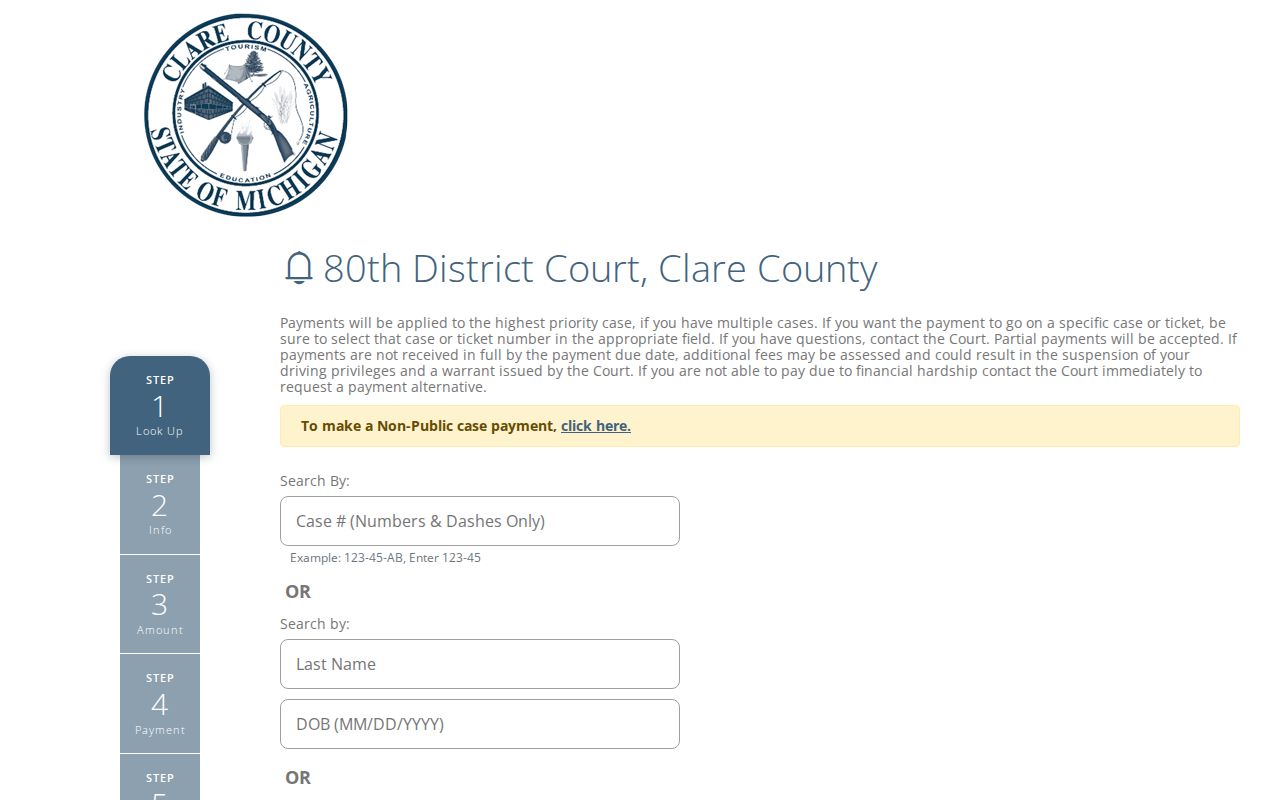
Clare County Clerk's GovPayNet fines and costs page takes a defendant name plus a case or citation number. It only processes payments. For docket details, use the district docket or contact the court office.
Two Records: Court File and Driver File
A traffic case actually lives in two separate records. The court file at Clare County covers the citation and the case itself. The driver file is different. Michigan's Secretary of State keeps that one. It holds convictions and license points reported by the courts. A payment portal or a MiCOURT display is not a full driver-history report. It proves nothing about what the state record says.
| Record | Custodian | What it concerns | Local access route |
|---|---|---|---|
| Court traffic file | 80th District Court and its court-record process. | Citation, case history, response, hearing, disposition, and court-exposed payment information. | Local payment lookup, MiCOURT where available, or the district court office. |
| State driver file | Michigan Secretary of State. | License points and convictions reported to the state. | State driver-record process, separate from the Clare court docket. |
Knowing which record you need saves time. The court file answers questions about a Clare citation's date, response, and case history. The driver file is a state matter. Take those questions to the state office that holds it.
Clare County Municipal Traffic Routes
Municipal sources often come before a court docket, but they are not the docket. Farwell's ordinance sets up a municipal civil-infraction and ordinance-violations bureau at Village Hall. A contested or removed matter can then go to district court. City police or a village bureau may hold the stop record, the incident report, or the initial citation number. Once the case reaches the 80th District Court, the judicial history lives there. When you request a record, name the source precisely: city police file, village bureau file, county district docket, or state driver file. That local layer is exactly why a city document search cannot replace the court check on a contested Clare County traffic case.
Traffic Record Copy Fees
The Clare County traffic-violation schedule lists local offense codes, fines, and waiver entries. A schedule is not an answer to a contested citation, a late payment, or a court-record request. Michigan's baseline for court records is $1 per page for a plain copy, with $10 certification plus $1 per page where no special provision applies. Confirm the district court's current copy process before ordering a certified traffic record.
| Item | Amount shown | Record note |
|---|---|---|
| Plain court copy | $1 per page | Michigan baseline identified in the court-records research. |
| Certified court copy | $10 certification plus $1 per page | Baseline under MCL 600.2546 when no special provision applies. |
| Stop-sign schedule entry | $130 | Current local schedule entry, not a court finding in a particular case. |
| Traffic-signal schedule entry | $135 | Current local schedule entry, subject to the official schedule and court process. |
| Speeding schedule entries | Generally $110 to $210 | Several listed code ranges and related entries appear in the local PDF. |
Schedule entries change over time. Rely on the current official PDF and the court's instructions for your citation rather than treating a table entry as a final court determination.
Clare County Traffic Schedule Limits
Michigan PayTix offers a state ticket-search interface that can supplement the local court route. Pick a county and court, then search by ticket, name and date, driver's license, or plate. The official page notes that periodic maintenance occurs.
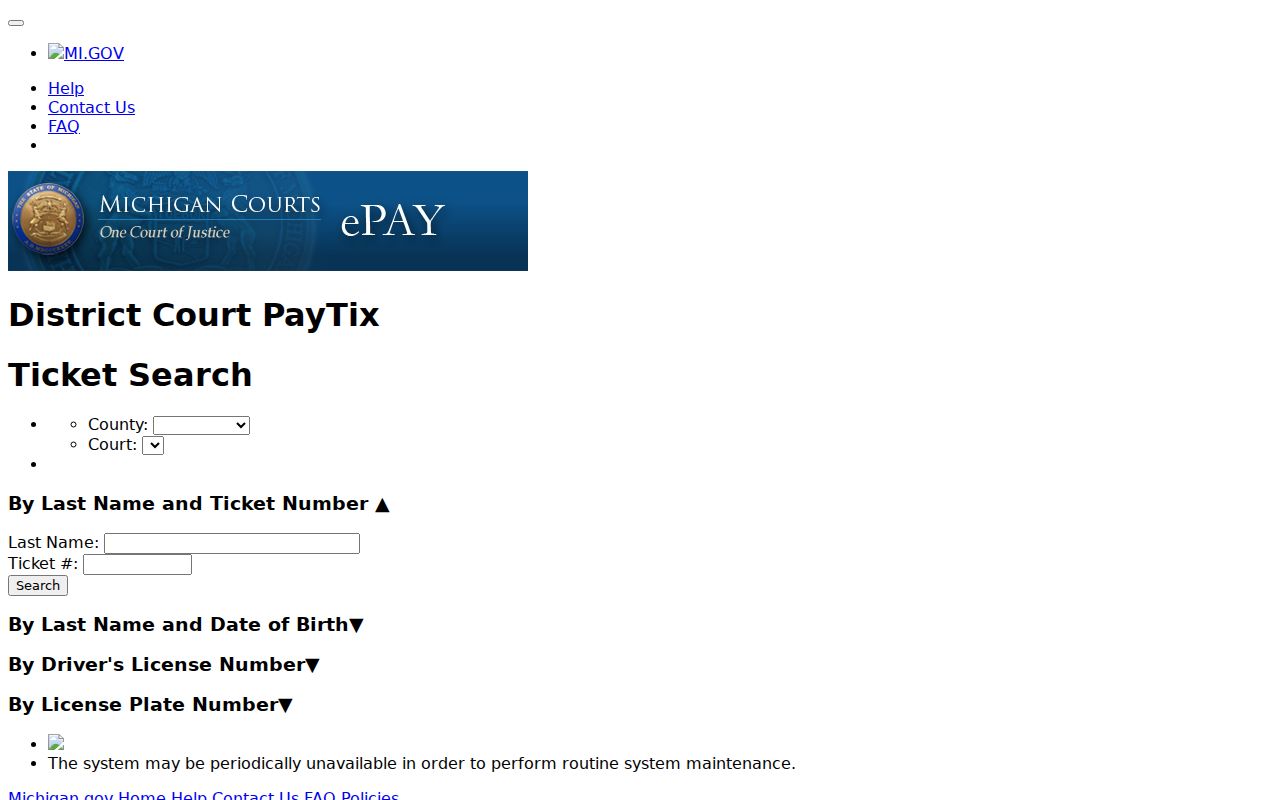
The local court payment portal stays the primary way to pay in Clare. The state interface and the local schedule can point you to current information. Neither one resolves a hearing, a disputed citation, or a file-copy request; that is the court's job.